

The MO-211 Edge: Elevate Your Excel Career Now

Earning the Microsoft Office Specialist (MOS) Excel Expert (Microsoft 365 Apps) certification, known by its exam code MO-211, signifies a profound mastery of Microsoft Excel. This credential validates an individual’s advanced abilities to perform a wide range of sophisticated Excel tasks, from intricate data management and complex formula creation to advanced chart design and automation with macros. It goes beyond basic proficiency, equipping professionals with the expertise to tackle complex data challenges and drive significant productivity enhancements within any organization. This article serves as a comprehensive guide, offering practical insights and strategies to confidently approach and conquer the MO-211 exam.
Grasping the MO-211 Certification Purpose
The MO-211 Microsoft Excel Expert certification is designed for individuals who possess a comprehensive understanding of Excel's advanced features and functionalities. It targets those who work with significant amounts of data, requiring sophisticated analysis, presentation, and automation skills. Achieving this certification demonstrates a commitment to professional development and signals to employers a high level of technical competency.
This Microsoft certification is more than just a piece of paper; it’s a recognized standard for Excel expertise.
It assures employers that certified professionals can handle complex spreadsheets, analyze data effectively, and create impactful reports, directly contributing to data-driven decision-making processes. The MO-211 credential is a testament to one's ability to maximize productivity and efficiency through advanced Excel usage.
Insights into the MO-211 Exam Structure
Understanding the layout of the MO-211 exam is crucial for effective preparation.
This assessment evaluates practical, scenario-based skills rather than purely theoretical knowledge.
Candidates are expected to perform tasks directly within the Excel application, reflecting real-world challenges.
The exam details are structured to test a broad spectrum of advanced Excel capabilities.
• Exam Name: Microsoft Office Specialist - Excel Expert (Microsoft 365 Apps)
• Exam Code: MO-211
• Exam Price: $100 (USD) – This cost can vary by region, so it’s always wise to check local pricing.
• Duration: 60 minutes – Time management is essential given the number of tasks.
• Number of Questions: 40-60 – Each question often involves multiple steps to complete a task.
• Passing Score: 700 / 1000 – A solid score demonstrates expert-level proficiency.
These parameters highlight the intensive nature of the MO-211 assessment, requiring both accuracy and speed.
A structured approach to practice, focusing on timed task completion, significantly enhances readiness.
Candidates should familiarize themselves with these details to build a focused study plan.
Exploring the MO-211 Syllabus Topics
The MO-211 course covers four main domains, each carrying a specific weightage in the exam,
emphasizing a balanced understanding of Excel's expert features.
A comprehensive review of the syllabus ensures no critical area is overlooked during preparation.
Understanding these sections helps in allocating study time efficiently.
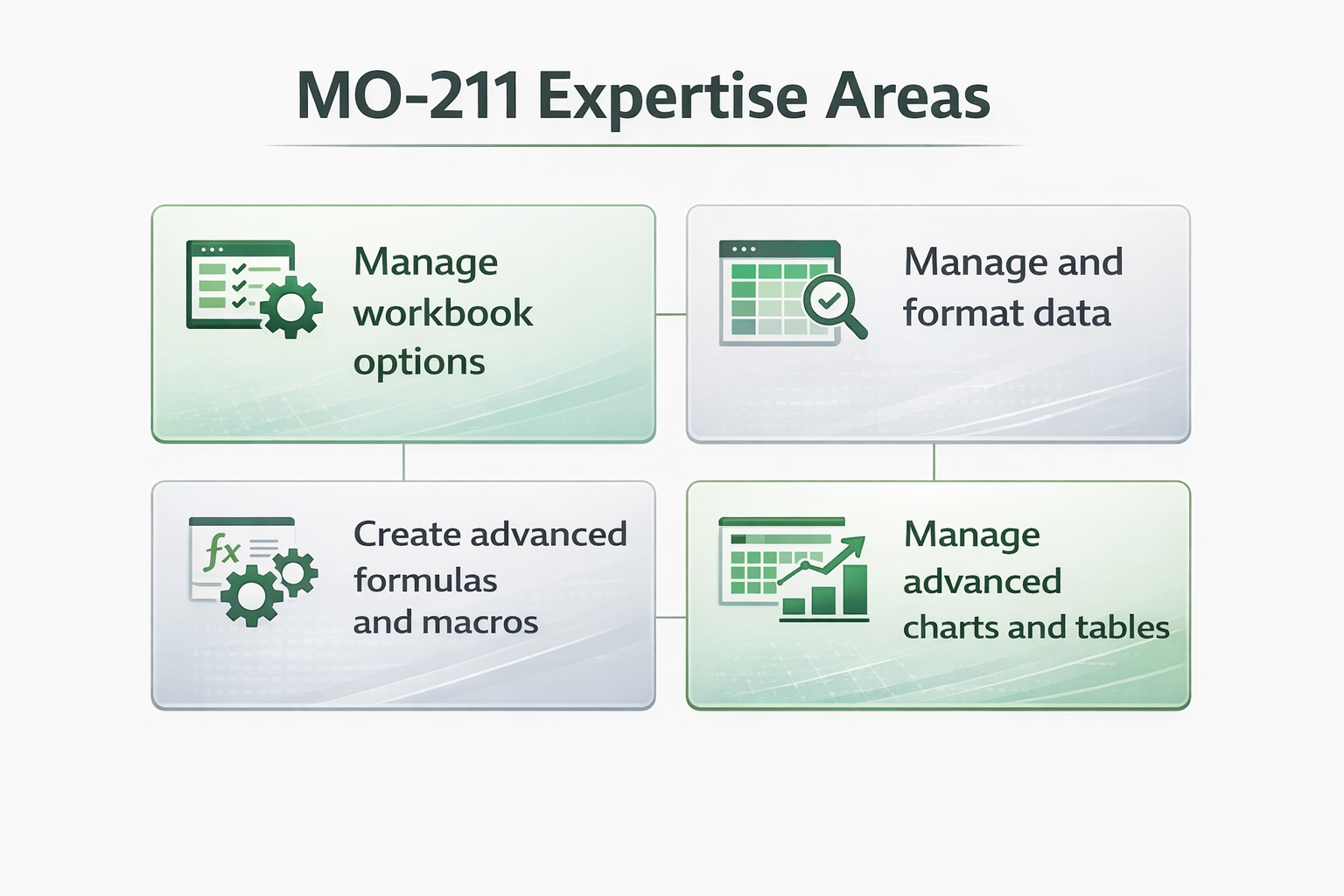
Workbook Management and Settings (10-15%)
This section focuses on configuring workbook properties, managing themes, and ensuring document accessibility.
It involves tasks that optimize the workbook for sharing and collaboration.
• Setting advanced workbook properties and options.
• Managing workbook themes, creating custom color palettes, and applying fonts consistently.
• Configuring content for collaboration, including protecting worksheets and workbooks, and managing shared workbooks.
• Implementing accessibility tools and checking for compatibility issues to ensure broad usability.
Advanced Data Management and Formatting (30-35%)
This domain is central to handling and organizing large datasets effectively.
It includes advanced techniques for data manipulation, validation, and conditional formatting rules.
• Applying custom number formats and advanced conditional formatting rules, including formulas for criteria.
• Managing data validation rules to ensure data integrity and consistency within spreadsheets.
• Working with data outlines, subtotals, and grouping data for analytical purposes.
• Utilizing advanced sorting and filtering capabilities, including custom lists and calculated fields.
• Importing and exporting data from various sources, and transforming data using Power Query.
Creating Complex Formulas and Macros (25-30%)
This crucial section delves into the analytical power of Excel, focusing on intricate formulas and
the automation capabilities offered by macros. Proficiency here is a hallmark of an Excel Expert.
Candidates should expect to work with an array of functions, demonstrating their ability to combine them
for sophisticated calculations and data lookups. Recording and editing macros further enhances efficiency.
Employing advanced lookup functions such as VLOOKUP, HLOOKUP, INDEX, and MATCH, along with newer functions like XLOOKUP.
Using logical functions (AND, OR, NOT), text functions (LEFT, RIGHT, MID, CONCAT), and date/time functions.
Implementing financial and statistical functions for complex calculations.
Creating array formulas for multi-cell calculations and using error-handling functions like IFERROR.
Recording, running, and editing simple macros to automate repetitive tasks.
For a more detailed breakdown of these topics, consulting the official syllabus is highly recommended.
You can find a comprehensive guide on the
Microsoft Excel Expert 365 Apps exam syllabus
page, providing clarity on specific sub-topics and their nuances.
Managing Advanced Charts and Tables (25-30%)
This domain assesses the ability to visualize data effectively through advanced charting and
structured table features, transforming raw data into insightful presentations.
It covers various chart types and advanced PivotTable functionalities.
• Creating and modifying advanced chart types, including combo charts, sparklines, and waterfall charts.
• Adding trendlines, error bars, and custom data labels to enhance chart analysis.
• Managing PivotTables, including creating calculated fields and items, and using slicers and timelines for dynamic filtering.
• Building PivotCharts from PivotTable data, customizing their appearance and functionality.
• Utilizing advanced table features like structured references and dynamic ranges.
Elevating Your Career with MO-211 Certification
Obtaining the MO-211 Microsoft Excel Expert certification can significantly
bolster your professional profile and open doors to new career advancement opportunities.
It’s a clear indicator of a specialized skill set highly valued across various industries.
This credential proves not just familiarity, but true mastery of a critical business tool.
Professionals with expert-level Excel skills are in high demand across fields such as finance,
data analysis, project management, and business intelligence. The MO-211 certification
can lead to roles requiring advanced data manipulation and reporting,
providing a tangible competitive advantage in the job market.
Tangible Benefits for Professionals
• Increased Employability: Certified experts often stand out in a competitive job landscape, making them more attractive to potential employers seeking specialized skills.
• Enhanced Productivity: Mastery of advanced Excel features translates into greater efficiency in data handling, reporting, and analysis, saving valuable time and resources.
• Higher Earning Potential: Specialized certifications are frequently linked to increased salary prospects,
reflecting the value expert-level skills bring to an organization.
• Credibility and Recognition: The MOS Expert title is a globally recognized badge of honor, confirming your ability to excel in data-intensive roles.
• Foundation for Further Specialization: The deep understanding gained from MO-211 prep provides a strong foundation for pursuing more advanced data analytics or business intelligence certifications.
Crafting an Effective MO-211 Study Plan
Successfully passing the MO-211 exam requires a strategic and disciplined approach to studying.
Blindly memorizing functions won't suffice; instead, focus on practical application and scenario-based problem-solving.
This certification demands hands-on experience and a thorough understanding of how different features interact.
Strategic Preparation Techniques
- Review the Official Syllabus: Begin by thoroughly understanding the syllabus, noting the weightage of each domain.
This provides a roadmap for allocating your study time effectively, ensuring you cover all required areas.
- Hands-on Practice is Key: Excel is a practical tool. Dedicate significant time to performing tasks directly within Excel.
Recreate scenarios from the syllabus topics, experimenting with different functions, data tools, and chart types.
- Utilize Practice Tests: Engaging with practice assessments is invaluable. Platforms like Edusum offer resources to simulate the exam environment,
helping you identify areas of weakness and build confidence. Focus on understanding the solution logic, not just getting the right answer.
Refer to Official Microsoft Resources: The official Microsoft learning page for this certification, available at Microsoft Learn resources, provides valuable insights, study paths, and often practice assessments.
Create a Study Schedule: Consistency is vital. Break down the syllabus into manageable chunks and dedicate regular study sessions.
Allocate more time to areas where you feel less confident or which carry higher exam weightage.
Master Advanced Functions: Pay particular attention to complex formulas involving nested functions, array formulas, and advanced lookups (XLOOKUP, INDEX/MATCH). Understand their syntax, arguments, and practical applications in various contexts.
Practice Data Management and Visualization: Spend time on Power Query transformations, advanced conditional formatting with formulas, and building dynamic PivotTables and PivotCharts. The goal is to efficiently extract insights from raw data.
Understand Macros (Record and Edit): While extensive VBA coding isn't expected, knowing how to record, run, and make minor edits to simple macros is essential. This aspect of the MO-211 prep focuses on automation for efficiency.
Avoid the temptation of using "exam dumps." Not only is this unethical, but it also deprives you of genuine learning and the practical skills that the MO-211 certification aims to validate. True expertise comes from understanding and applying the concepts.
Leveraging External Training Resources
While self-study is effective, structured training can provide invaluable guidance and a comprehensive learning path.
Consider enrolling in a dedicated MO-211 course or boot camp to deepen your understanding and accelerate your preparation.
• Online Courses: Many platforms offer detailed video lectures, hands-on exercises, and quizzes covering the entire MO-211 syllabus. These courses are often self-paced, allowing flexibility for working professionals.
• Instructor-Led Training: For those who benefit from direct interaction and immediate feedback, instructor-led sessions can provide a focused and immersive learning experience.
• Study Groups: Collaborating with peers can provide different perspectives, help clarify difficult concepts,
and offer motivation. Discussing topics and solving problems together can reinforce learning.
• MO-211 Study Guide PDF: Look for well-structured study guides that follow the official syllabus.
These often contain practice questions, detailed explanations, and tips for navigating the exam.
Overcoming Potential Exam Challenges
The MO-211 exam questions are designed to test your proficiency under pressure, which can present unique challenges.
Candidates often find time management and the multi-step nature of tasks to be the most demanding aspects.
Preparing for these specific hurdles can significantly improve your performance on exam day.
• Time Constraints: With 40-60 questions in 60 minutes, each task needs to be completed efficiently. Practice performing tasks quickly and accurately. Learn to prioritize and move on if stuck, returning later if time permits.
• Scenario-Based Tasks: The exam presents real-world scenarios, requiring you to apply your knowledge rather than just recall information. Focus on understanding why you're using a particular function or feature, not just how.
• Precision is Paramount: Excel tasks often require precise cell selection, correct function arguments, and accurate formatting. Small errors can lead to an incorrect solution. Double-check your work, especially on complex tasks.
• Navigating the Interface: The exam interface will be the actual Excel application. Be comfortable and quick with ribbon navigation, keyboard shortcuts, and contextual menus to save precious time.
The journey to becoming a Microsoft Excel Expert is challenging but incredibly rewarding. The MO-211 edge is not just about passing an exam; it’s about gaining a deep, practical understanding of Excel that transforms how you work with data. Embrace a consistent study routine, leverage diverse resources, and most importantly, practice, practice, practice. Your dedication will undoubtedly pay off, validating your expert-level skills and propelling your career forward.
Ready to gain the MO-211 edge and stand out as an Excel expert? Start your focused preparation today. Explore comprehensive
study materials and practice tests to ensure you're fully equipped for success. For more insights and resources,visit Edusum's detailed guides and elevate your certification journey.
Frequently Asked Questions
Question 1: What specific software version does the MO-211 certification cover?
- The MO-211 certification is specifically designed for Microsoft Excel Expert (Microsoft 365 Apps), covering the features and functionalities available in the latest Microsoft 365 versions of Excel.
Question 2: Is the MO-211 exam entirely practical or does it include theoretical questions?
- The MO-211 exam is predominantly practical and scenario-based. You will be required to perform tasks directly within the Excel application, applying your knowledge to solve real-world problems presented in the exam interface.
Question 3: How long does the MO-211 certification remain valid?
- Microsoft Office Specialist (MOS) certifications, including MO-211, typically do not expire. They are valid for the version of the software they were earned on. However, with continuous updates to Microsoft 365, it's advisable to stay current with new features for continued relevance.
Question 4: Can I retake the MO-211 exam if I don't pass on my first attempt?
- Yes, you can retake the MO-211 exam. Microsoft has a retake policy that typically allows a second attempt shortly after the first, and subsequent attempts after a waiting period. Fees apply for each attempt.
Question 5: What kind of career roles benefit most from the MO-211 certification?
- Roles such as Data Analyst, Business Intelligence Analyst, Financial Analyst, Project Manager, Operations Manager, and any position requiring advanced data manipulation, reporting, and automation greatly benefit from the MO-211 certification.
About the author
- I’m Katy Morgan, a dedicated certification aspirant focused on achieving professional success through structured and strategic exam preparation
Comments
Join the discussionNo comments yet. Be the first to comment.


